
Latest News from the Swivel team

Product update
Feature update
New
Manage Your Calendar Directly From Swivel!

Shared by Swivel Support
• August 21, 2024
Hi there,
At Swivel we know how important it is to keep track of your day and the client information that goes along with it. So, we've created a calendar experience we think you will like.👇
Full Calendar Experience
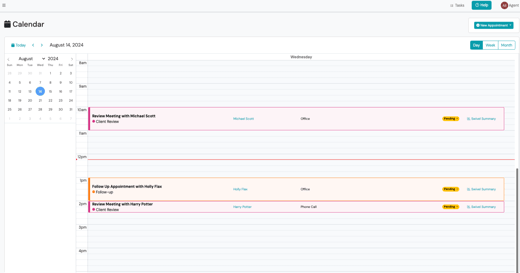
In addition to the current “Upcoming Event and Appointments” dashboard widget, users are now able to view their full calendar from the Calendar Tab on the left side navigation. This implementation gives users a day, week, and month view where they can edit and view current and upcoming appointments and marketing events assigned to them.
Viewing Your Calendar
With the full calendar experience, we have enhanced how users view their events and appointments. While on the day view within the Calendar Tab, users can quickly see the appointment details including the appointment name, location, the contact(s) associated to the appointment (with a direct link to the Contact View), status, and link to view each contact's Swivel Summary. Users can also select any appointment from any view (day, week, or month) to open the Appointment Details slide out.
Managing Your Calendar
We get it, appointments are always changing - that's why we have made it easy to edit appointments and create new ones directly from Swivel. Users can either drag and drop appointments or select "Edit" from the Appointment Details slide out to move an appointment date or time. To create a new appointment, users can either select the "New Appointment" button or select an open time slot on their calendar.